How does DaD's Request Line work?
DaD’s Request Line (RL) turns your contact list into a secure SMS relay. Bypass "one-account-per-number" limits by anonymously routing verification codes through trusted contacts. It’s a private, decentralized alternative to burned "receive SMS" sites—no apps or accounts required.


Building on the core DaD experience—where a human messenger makes a phone call for you—we’ve introduced the Request Line (RL). While the standard DaD service starts with you typing a message on our platform, the Request Line is a specialized feature designed to securely and anonymously route sensitive SMS data (like one-time codes) through a trusted network of your own contacts.
Why use the Request Line? Most online services today require a unique phone number for verification, which creates a significant bottleneck if you need to manage multiple accounts or separate your personal and professional digital footprints. Typical "receive SMS" websites provide public virtual numbers that are often already flagged or exhausted by these services. RL solves this by tapping into a trusted, distributed network of real mobile numbers. It’s not about offloading risk, but about expanding your access—allowing you to leverage "fresh" numbers from your own circle to bypass the "one-account-per-number" limitation, all while offering the same to like users. Maybe you're (User A) a heavy Service X user while User B is a heavy Service Y user... trade SMS verification ability.
Here’s how the Request Line works:
- Initiate the Session: You visit dad.june07.com/rl and provide your phone number to start a session.
- Recruit Your Network: You share your unique session link with contacts from your phone via a pre-populated SMS. This invites them to act as a "relay" for you.
- Anonymous Joining: Your contacts can join the session. While you (the requester) know who they are, the participants remain anonymous to one another, maintaining privacy within the group. The option to also remain anonymous as the requester on any future requests is also available.
- Select a Participant: Once participants have joined, you choose one to help with your request. The app then opens a private, secure channel between just the two of you.
- The SMS Relay: The app informs you that the participant’s number is ready. You then trigger an SMS (such as a 2FA code or verification link from an external service) to be sent to their phone instead of yours.
- The Hand-off: The participant receives the code and relays it back to you through the secure DaD session. Once you confirm receipt, the session is closed.
Deeper Dive
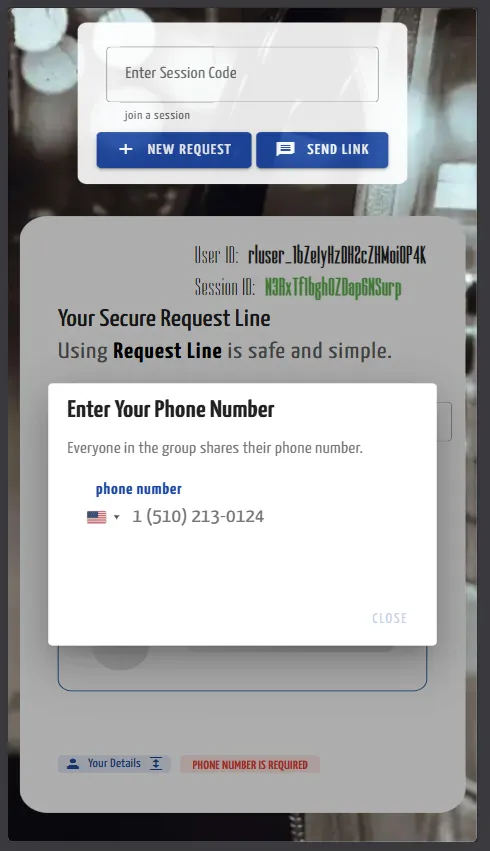
Securing Your Circle: Entering Your Phone Number and Unlocking Trust
You've landed on the Request Line app, perhaps invited by a friend or colleague, ready to set up your secure messaging circle. The first critical step, as you'll quickly discover, is to enter your phone number. And yes, you read that right on the screen: "Everyone in the group shares their phone number." This isn't just a formality; it's the lynchpin of how Request Line builds its decentralized, secure network.
Unlike traditional messaging apps that centralize trust with a single provider, Request Line empowers your group to verify each other. When you input your number, you're signaling your intent to participate and setting the stage for verification.
How Trust is Built: Two Paths to Verification
Your phone number, once entered, will appear to other group members, but it will initially be marked as "unverified." This transparency is key. Request Line gives you two distinct, group-driven ways to achieve verification, ensuring that trust is earned, not just assumed:
- Secret Code Confirmation: Upon entering your number, you gain the ability to send a secret code via SMS to the group. Any existing, verified member of your group can then confirm receipt of this code within the app. Once they do, your status instantly updates to "verified." This method leverages existing trust within the group to quickly onboard new members.
- Successful Relay: The ultimate proof of participation and capability is a successful message relay. If a verified group member designates you as a relay and you successfully forward an SMS message through the Request Line, your phone number automatically becomes "verified." This method proves your active contribution to the network's function.
Why This Matters: Informed Choices in a Decentralized Network
You'll notice that every participant's verification status is clearly displayed in the UI. This isn't just for show; it's a fundamental aspect of Request Line's security model. As a group member, you have full visibility into who is verified and who is still pending. This empowers you to make informed decisions about:
- Relay Selection: When you need to send a message through the group, you can consciously choose to route it through a verified member, adding an extra layer of confidence to the process.
- Group Security: The collective awareness of verification status strengthens the entire group's security posture, fostering an environment where active, confirmed participants drive the network.
By requiring phone numbers and implementing this unique, group-centric verification process, DaD's Request Line ensures that your private messaging network is built on explicit consent and mutual trust, rather than relying on a third-party intermediary. It's about putting the power of security and connection directly into the hands of your group.
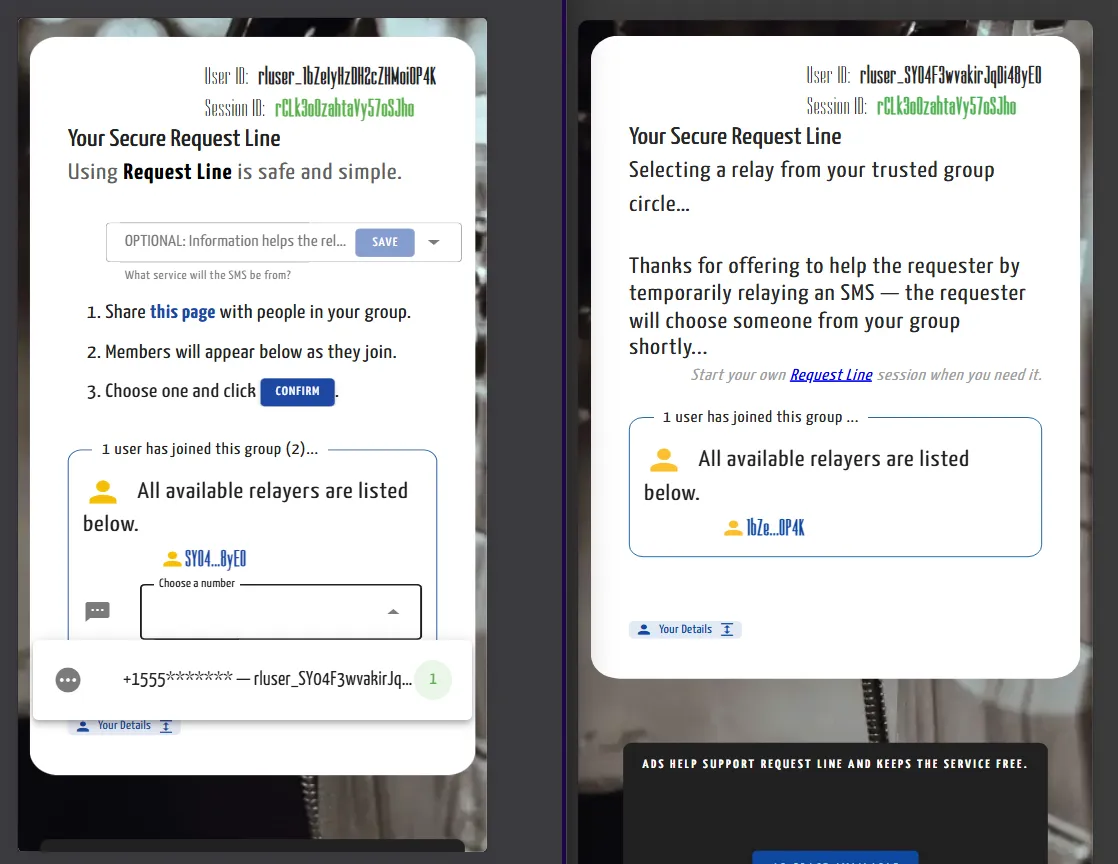
The Power of the Peer-to-Peer Relay: From Selection to Success
This screen recording captures a live end-to-end session on DaD’s Request Line, demonstrating the decentralized coordination between a requester (left) and a relayer (right). The video shows the requester selecting a relay member with a redacted phone number, the relayer being notified of their role, and the real-time synchronization as a "one time code" is pasted by the relayer and instantly appears on the requester's dashboard. The process concludes with a "Request Complete!" confirmation for both parties, showcasing the app's seamless, trust-based SMS routing.
Important Notes:
- Streamlined Access: To keep the experience frictionless, the Request Line eschews traditional OAuth/password logins. Instead, it uses cryptographically "hard to guess" strings for user IDs and URLs to ensure security without the hurdle of an account.
- The Intelligent Phone Book: The backend intelligently tracks which contacts have helped you in the past. Over time, it builds a personal "phone book" for you. For future requests, the system will attempt to reach out via Web Push notifications first, falling back to SMS only when necessary.
- Privacy & Utility: This feature allows you to receive sensitive verification data without exposing your own primary number to third-party services, leveraging the power of your existing social circle with a layer of technical anonymity and coordination.
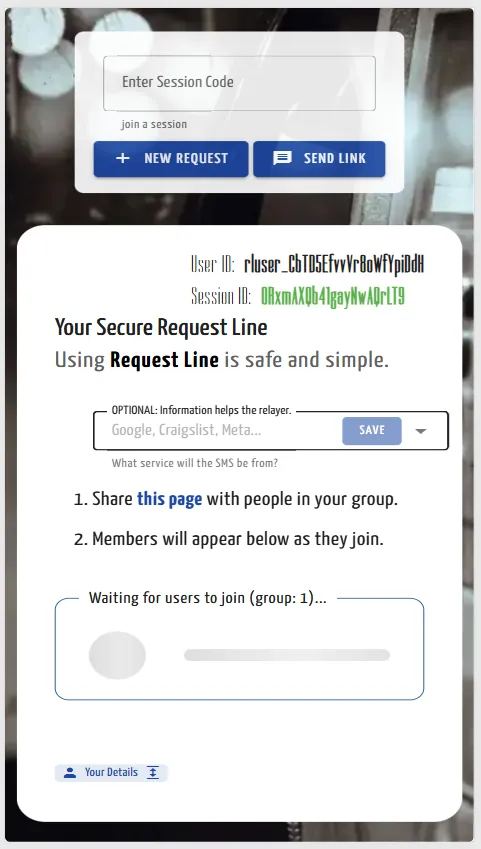
The Request Line turns your contact list into a private, secure infrastructure for handling the digital "gatekeepers" of the modern web.